

Kritik Streamlined Activity Creation
A simplified, guided flow that helps instructors launch peer assessment and AI authorship activities faster
Summary:
When Kritik360 and VisibleAI merged into Kritik, instructors had two very different ways to set up an assignment: Kritik360's long single-page activity form and VisibleAI's assignment form. I redesigned activity creation into a step-by-step wizard where instructors first pick an activity type, then see only the settings that type requires, focusing on the mental model of traditional assignment creation.
Problem: The original Kritik360 form put everything on one page: activity type, details, rubric, more than ten activity options, and a late-submission matrix. Adding VisibleAI's authorship settings on top would have made it longer still, and instructors had no clear way to tell when an activity used peer assessment, authorship tracking, or both. The two codebases were also merging, so the flow needed one shared foundation.
Approach: I ran instructor walkthroughs and built AI critique personas (professor, student, product designer) that drove both research and design, pressure-testing findings and iterations. I mapped both products' main creation forms side by side, then moved from one combined form to a bite-sized step wizard, iterating through accounts using both products and accounts using just one.
Impact: Increased first-time user activity scheduling by 35%
Company
Kritik Education
Year
January 2026 – May 2026
Role
Product Designer






Opportunity Space
Kritik brought peer assessment and AI authorship tracking into one product, but activity creation still reflected two separate products with separate experiences. That made it the first place an instructor would notice the seams, especially for a new instructor creating their students' first activity. A unified creation flow was the chance to explain what Kritik does at the exact moment an instructor decides how to use it.
At the same time, the existing activity creation flow was long overdue for a shake-up, and bundling a suite of products was the perfect opportunity to make an important business decision and learn how we could drive product-led growth.
Where we started
Kritik360's form asked instructors to choose between Individual, Calibration, Group, and Live Presentation, then scroll through details, rubric, activity options, and late-submission settings on one long page, often bouncing back and forth and requiring a lot of hand-holding.
VisibleAI's assignment form was simpler, but organized around the Instructor’s AI policy: self-reflection, authenticity score thresholds, and AI assistant settings.
Original Kritik360 activity form
Original VisibleAI assignment form
Research Practices
We validated the new flow through tracking data and interviews with users who had experience with both sides of our product suite as well as a combination.
We provided them with a clickable prototype so that they could test the flow for themselves
To see where instructors spend effort in setup, I looked at data for 60,000+ pre-wizard activities. About 50% had an instructor-built rubric, so rubric setup earned its own step.
In parallel, a heuristic review of the creation flow found that instructors were learning Kritik's vocabulary by running into errors:
Required fields weren't marked, the group-set requirement only surfaced on the last step, and terms like "grading power" weren't explained where they appeared.
Key Insights
Instructors think in terms of "what kind of assignment is this?" before they think about settings.
Most settings have sensible course defaults and don't need to be seen every time.
Peer assessment and authorship tracking need to be presented as building blocks that can be combined, not as two products.
Instructor interviews corroborated the tracking data available for rubric setup effort
Concepts and Iterations
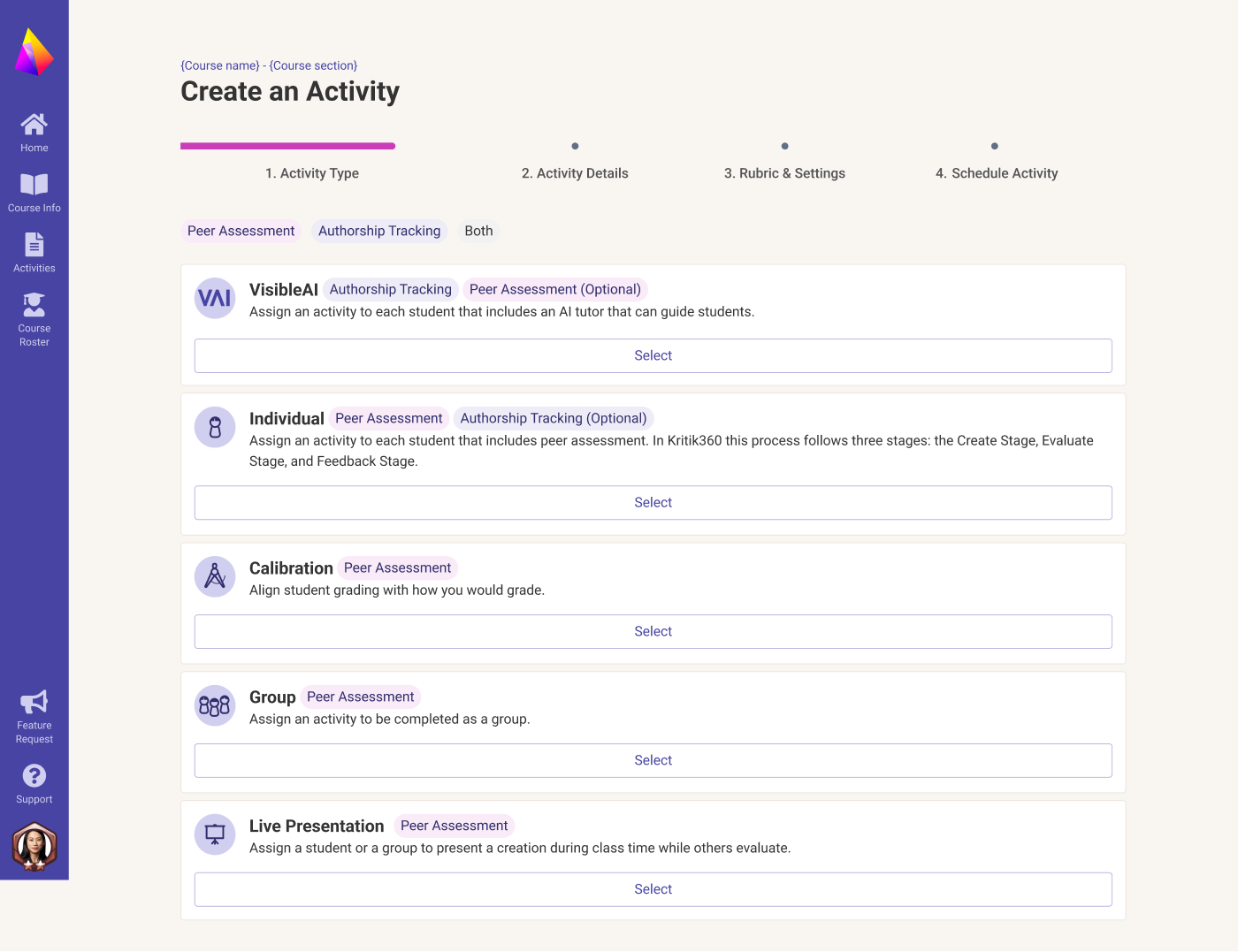
I explored many directions before settling on the final flow. Early versions kept a single form and added Peer Assessment Settings, Scoring and Late Submissions as collapsible cards. That reduced scrolling, but the activity type still felt disconnected from the settings it controlled.
Later iterations moved type selection to the start and tagged each type with what it includes (Peer Assessment, Authorship Tracking, or optional add-ons). This made the combinations explicit, and it let us serve accounts using one or both products by showing or hiding options, without separate flows.
Main challenges: Maintaining an uncluttered, consistent flow while surfacing the available settings by activity type and the products in use, and deciding which steps benefit from agentic assistance.
Early exploration: Authorship Tracking as its own activity type
Account using just peer assessment: a shorter three-step flow
Editing an activity, with the option to add Authorship Tracking
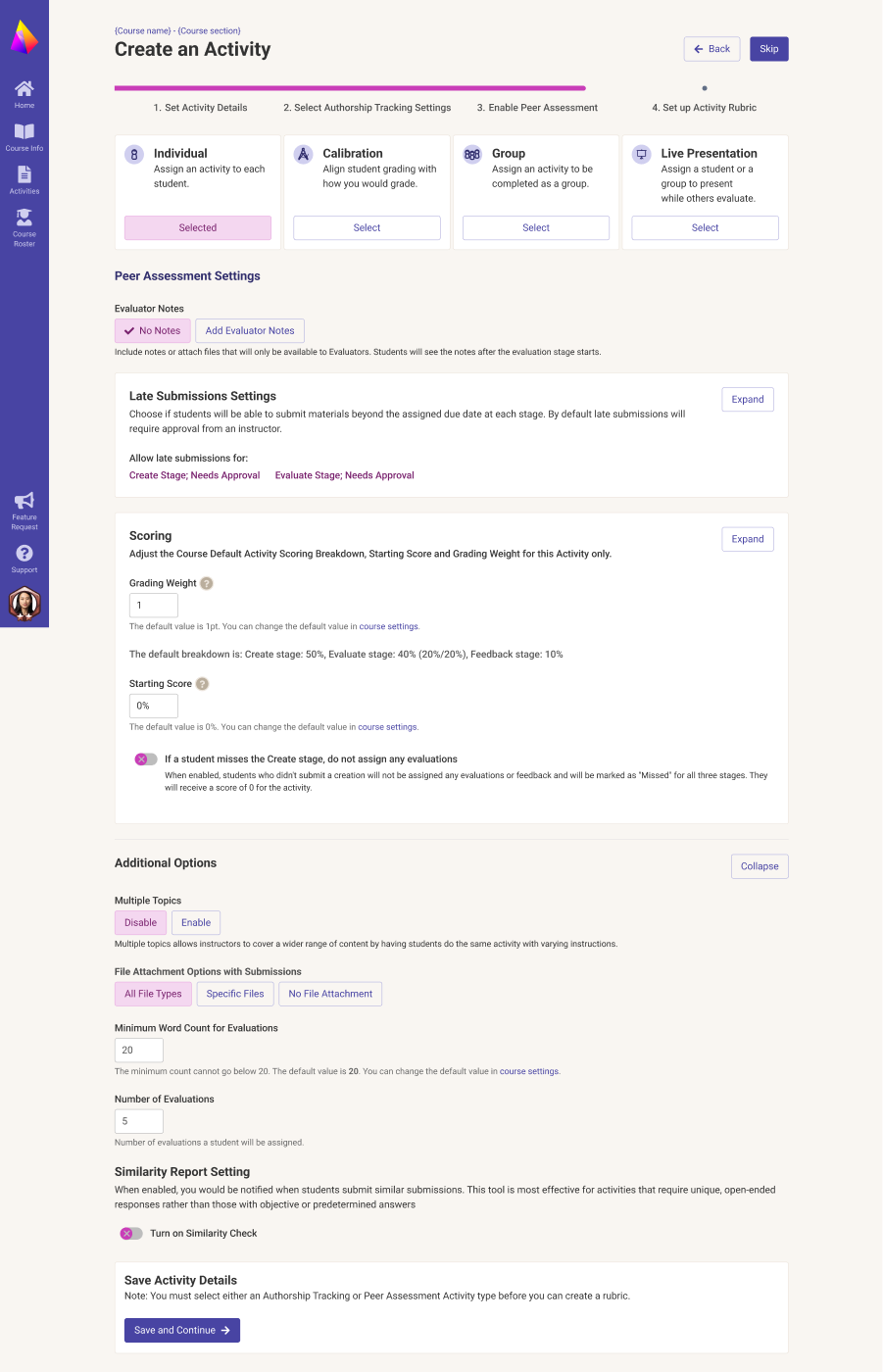
Iteration: one form with collapsible peer assessment, scoring and late submission settings
Limitations: the user’s rubric based on activity type and did not prompt them to schedule their activity.
Iteration: activity types tagged by what they include
This was the first attempt that followed the type-first mental model, focusing specifically on feature availability and upsell opportunities.
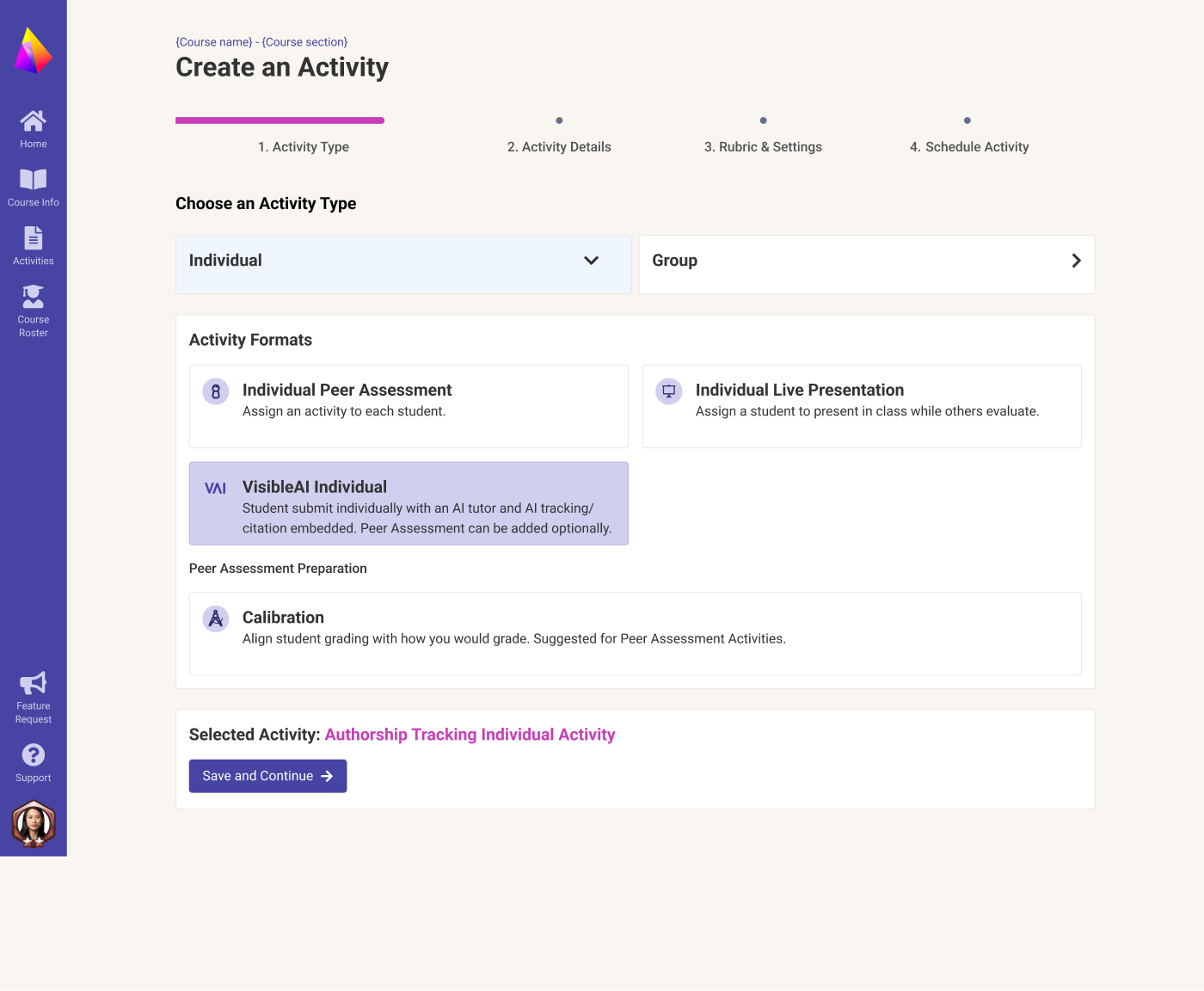
Iteration: Step 1, choosing Individual or Group, then a format.
This made the beginning of the flow more bite-sized, reflecting how Customer Success would guide users to choose between Individual and Group activities.
A four-step wizard
Activity creation became four steps: Activity Type, Activity Details, Rubric & Settings, and Schedule Activity. Instructors start by choosing Individual or Group, then a format based on their pedagogy: peer assessment or writing authorship (VisibleAI). Calibration helps students practice giving feedback and serves as a conditional reminder.
Start with Create with AI: share an activity idea or course materials, then review Kritik’s drafted objective, instructions, and rubric in four steps.
Solutions & Outcomes
Live on Kritik: Create with AI drafts the activity, then the instructor reviews it step by step: Type, Details, Rubric & Settings, Schedule
Details that match the activity
Step 2 only shows what the selected type needs. An authorship-tracking activity shows AI policy and authenticity score thresholds, with peer assessment as a toggle under Additional Options. A group activity shows group set management, including syncing groups from the LMS.
Authorship tracking activity details
Group activity details with group set management
Solutions & Outcomes
Solutions & Outcomes
Editable Rubric
Based on activity details, we offered a pre-populated rubric so no one had to start from scratch. Some instructors valued the context-aware rubric; others preferred their own and wanted to manage it on the same page.
Import Rubric & Modify with AI:
I designed these features so instructors could drop in a file or photo of their rubric, generating an editable Kritik rubric, ready to adjust manually or tinker with a prompt.
Import Rubric: generating an editable version of the instructor's file
Built-in safety nets
The wizard also autosaves as instructors work, warns before they leave with unsaved changes, and supports undo.
Modify with AI: conversational changes that update the rubrics in place.
Results and Impact
In the first semester after launch, the share of new instructors who scheduled an activity in their first course increased from 17% to 23%, despite having one fewer year on the platform than the previous cohort.
Project Lessons
When an epic is fast-tracked, launch can be the start of important design work and implementation that had to be cut from scope. After the April 2026 launch, internal feedback surfaced friction we fixed in quick cycles: a "Cancel" button that actually saved became a clear Cancel, with unscheduled drafts saved separately. Editing forced users to click through every step. This quickly introduced a Previous button and a way to discard changes and exit, along with autosave and Undo.
Measure the user flow, not just the product. Customer Effort Score rose after those fixes (68% of ratings from October 1–21 were 6–7, up from 44% in August–September), but the lift didn't hold, and CES reflects the whole product. Next time I'd pair fast iteration with a metric scoped to activity creation itself.